Spies in the Computer
Last edited - June 5, 2026
Essentially, all models are wrong, some are useful.
George Box
Article & computer game
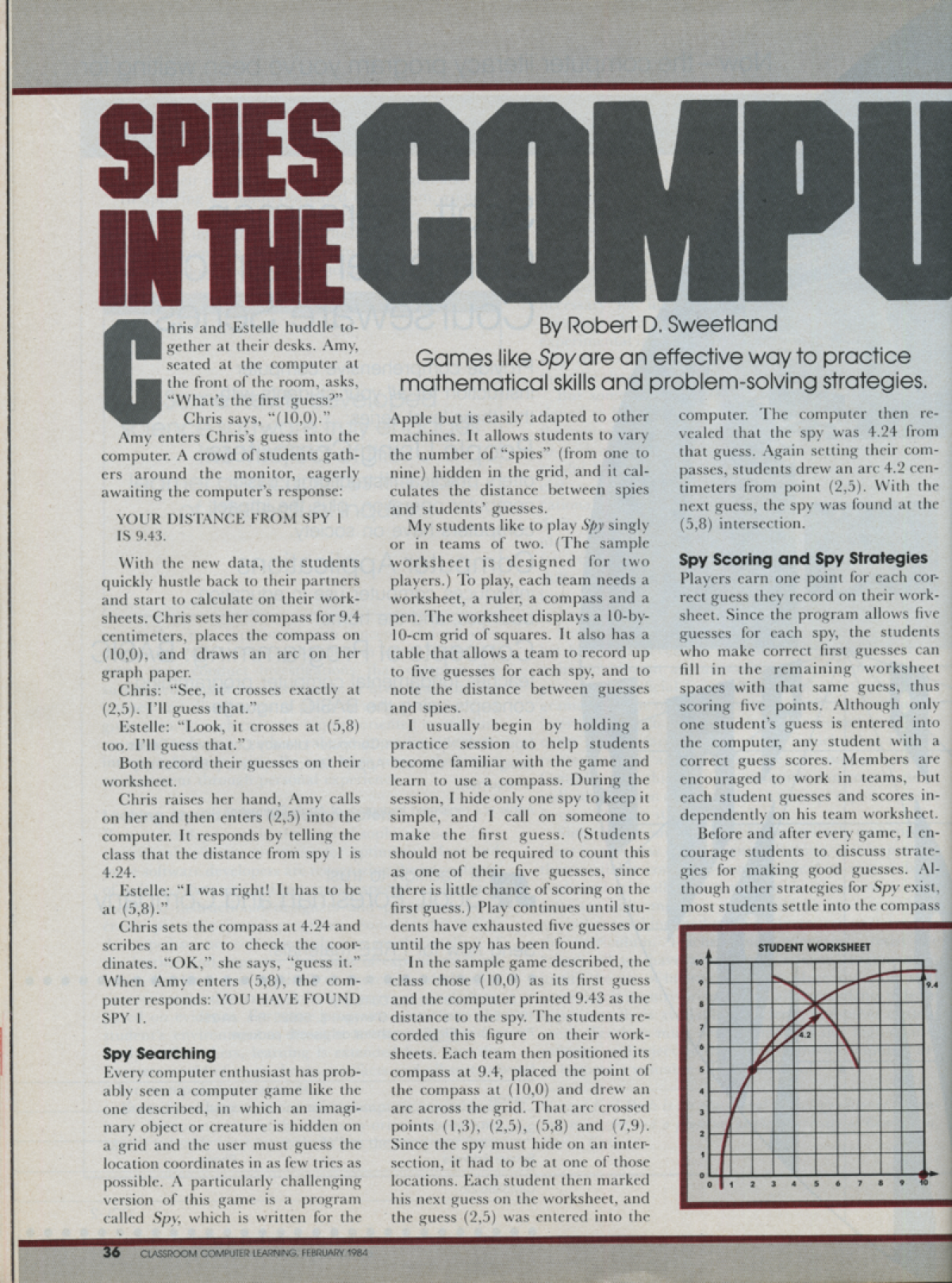
Spies in the computer is a computer game which was easily programmed in Basic and used to help learners with problem solving, models, Cartesian coordinates, Pythagoran theorem, number value, rounding numbers, and computer coding. The article below explains how I used it first in the 1980's!
Following this initial use I always wanted to add to the program and was not able to achieve that until later, when I was able to combine the use of Python and the IDLE environment with my programming ability and an assist with AI to create four modifications of Spies in the COMPUTER.
- Historical terminal game
- Game in a game window without a grid
- Game in a game window with a grid and special effects
- Game with backdoor
Enjoy!
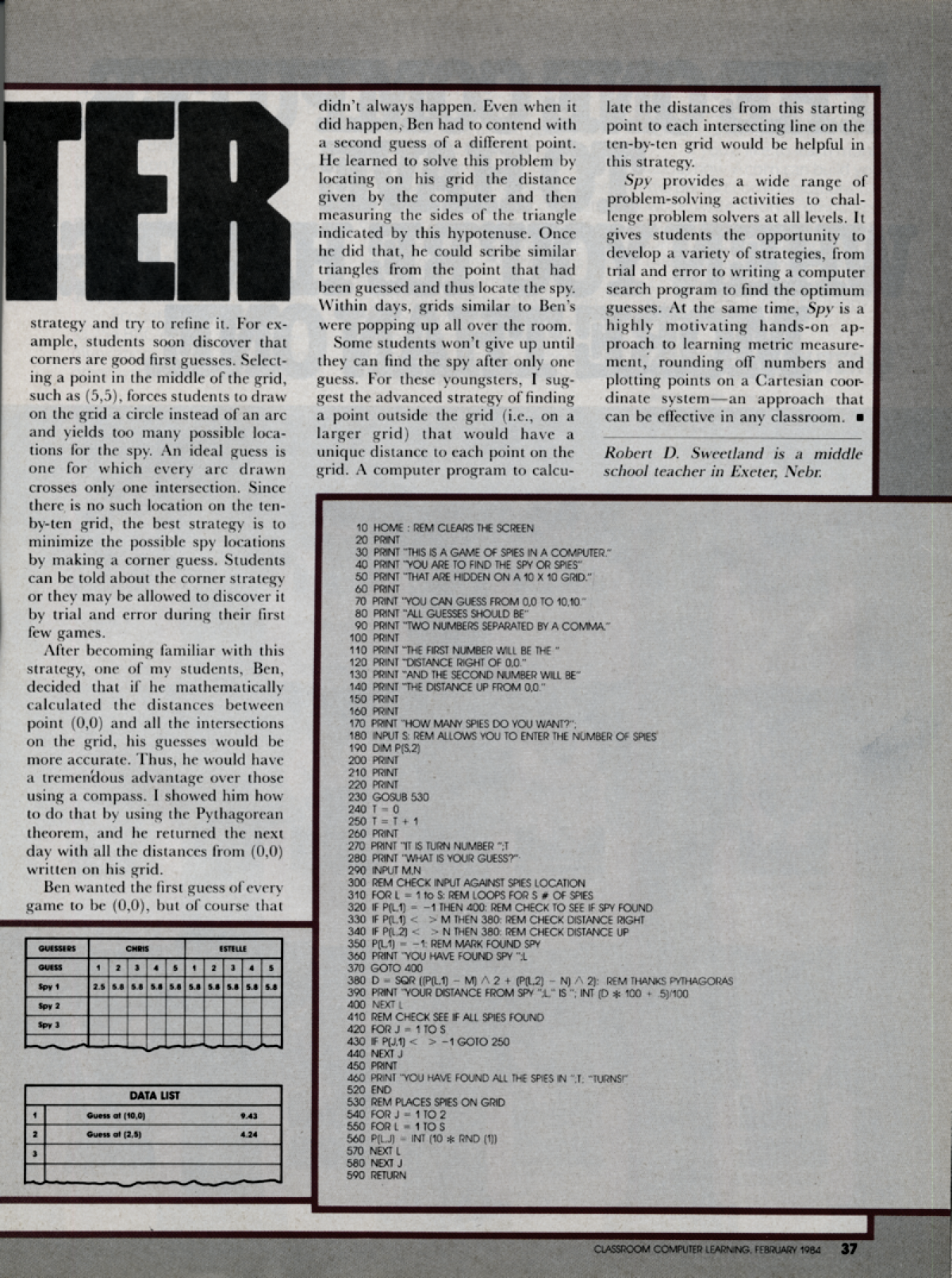
Original article in Classroom Computer Learning, February, 1984.
Materials
- Chart - Worksheets
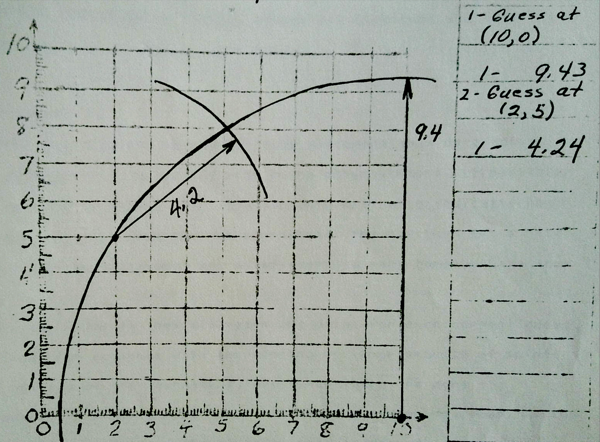
- Two guesses illustrated
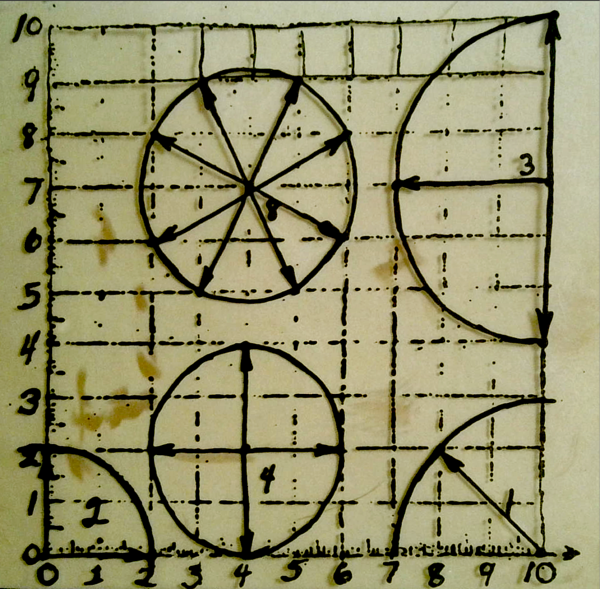
- Whole numbers examples from different starting positions
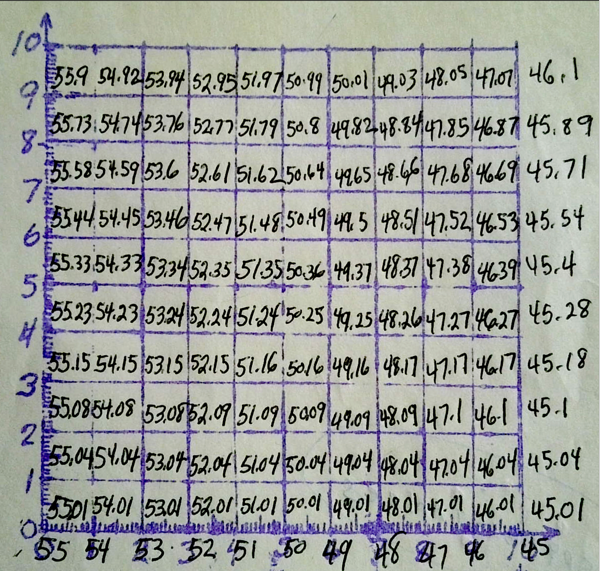
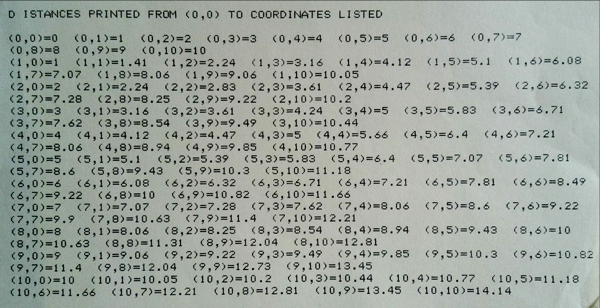
- Print out for all grid distances from 0,0
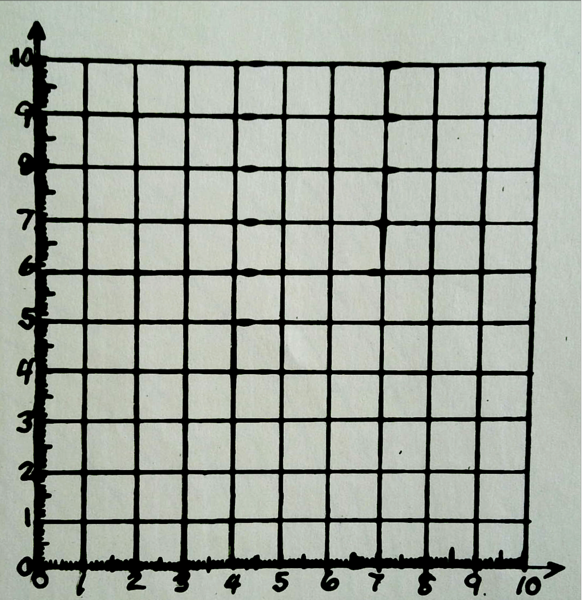
- Blank grid - worksheet
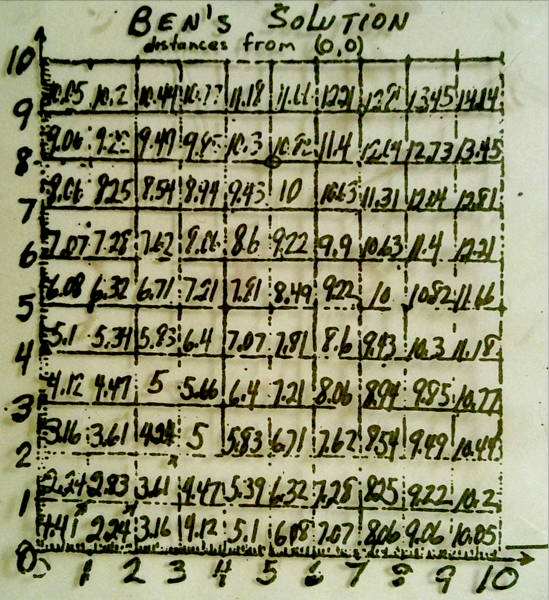
- Ben's solutions
- Guesses for 0, 55
BASIC Code for spies in the computer!
  10 HOME : REM CLEARS THE SCREEN
  20 PRINT
  30 PRINT "THIS IS A GAME OF SPIES IN A COMPUTER."
  40 PRINT "YOU ARE TO FIND THE SPY OR SPIES"
  50 PRINT "THAT ARE HIDDEN ON A 10 X 10 GRID."
  60 PRINT
  70 PRINT "YOU CAN GUESS FROM 0,0 TO 10,10."
  80 PRINT "ALL GUESSES SHOULD BE"
  90 PRINT "TWO NUMBERS SEPARATED BY A COMMA."
  100 PRINT
  110 PRINT "THE FIRST NUMBER WILL BE THE "
  120 PRINT "DISTANCE RIGHT OF 0,0."
  130 PRINT "AND THE SECOND NUMBER WILL BE"
  140 PRINT "THE DISTANCE UP FROM 0,0."
  150 PRINT
  160 PRINT
  170 PRINT "HOW MANY SPIES DO YOU WANT?"
  180 INPUT S: REM ALLOWS YOU TO ENTER THE NUMBER OF SPIES
  190 DIM P(S.2)
  200 PRINT
  210 PRINT
  220 PRINT
  230 GOSUB 530
  240 T = 0
  250 T = T + 1
  260 PRINT
  270 PRINT "IT IS TURN NUMBER ";T
  280 PRINT "WHAT IS YOUR GUESS?"
  290 INPUT M,N
  300 REM CHECK INPUT AGAINST SPIES LOCATION
  310 FOR L = 1 to S: REM LOOPS FOR S # OF SPIES
  320 IF P(L,1) = -1 THEN 400: REM CHECK TO SEE IF SPY FOUND
  330 IF P(L,1) < > M THEN 380: REM CHECK DISTANCE RIGHT
  340 IF P(L,2) < > N THEN 380: REM CHECK DISTANCE UP
  350 P(L,1) =-1. REM MARK FOUND SPY
  360 PRINT "YOU HAVE FOUND SPY " L
  370 GOTO 400
  380 D = SQR (P(L,1) - M) ^ 2 + (P(L,2) - N) ^2): REM THANKS PYTHAGORAS
  390 PRINT "YOUR DISTANCE FROM SPY " L "IS " ; INT (D * 100 +  .5)/100
  400 NEXT L
  410 REM CHECK SEE IF ALL SPIES FOUND
  420 FOR J = 1 TO S
  430 IF P(J,1) < > -1 GOTO 250
  440 NEXT J
  450 PRINT
  460 PRINT "YOU HAVE FOUND ALL THE SPIES IN " ,T; "TURNS!"
  520 END
  530 REM PLACES SPIES ON GRID
  540 FOR J= 1 TO 2
  550 FOR L = 1 TO S
  560 P(L,J) = I NT (10 * RND (1))
  570 NEXT L
  580 NEXT J
  590 RETURN
Modifications with Python
As promised, the information that follows is three modifications of the Spies in the COMPUTER!
- Documentation about Python can be found at - https://docs.python.org/3/.
- Information about Python's releases and download (bottom of page) can be found at - https://www.python.org/downloads/release/python-3145/
All programs in gray boxes can be copied and pasted into the editor, saved, and ran.
Enjoy!
If you are interested in exploring Turtle Graphics, check out my Python information and beginning learning packet!
Spies in the COMPUTER game - historic teminal version
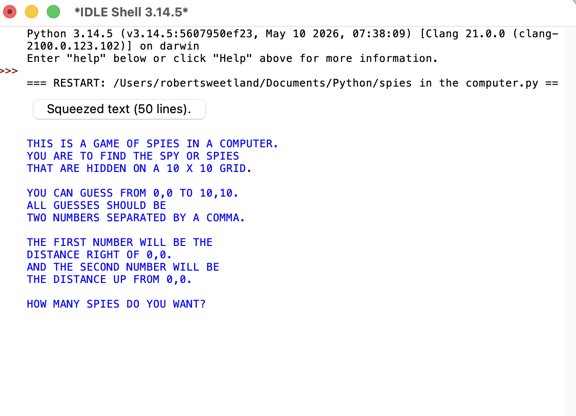
This is what will run if you enter the code below in the Pythion IDLE. What you would get in the 80's with a computer terminal running it.
import math
import random

# 10 HOME : REM CLEARS THE SCREEN
# In Python, we can simulate a screen clear by printing newlines
print("\n" * 50)

# 20 - 160 PRINT STATEMENTS (Intro Instructions)
print()
print("THIS IS A GAME OF SPIES IN A COMPUTER.")
print("YOU ARE TO FIND THE SPY OR SPIES")
print("THAT ARE HIDDEN ON A 10 X 10 GRID.")
print()
print("YOU CAN GUESS FROM 0,0 TO 10,10.")
print("ALL GUESSES SHOULD BE")
print("TWO NUMBERS SEPARATED BY A COMMA.")
print()
print("THE FIRST NUMBER WILL BE THE")
print("DISTANCE RIGHT OF 0,0.")
print("AND THE SECOND NUMBER WILL BE")
print("THE DISTANCE UP FROM 0,0.")
print()

# 170 - 180 INPUT S (Get number of spies)
while True:
    try:
        s_input = input("HOW MANY SPIES DO YOU WANT? ")
        S = int(s_input)
        if S > 0:
            break
        print("Please enter at least 1 spy.")
    except ValueError:
        print("Invalid input. Please type a whole number.")

# 190 DIM P(S,2) & 530 GOSUB (Initialize spy list and place them randomly)
# In Python, we use a list of dictionaries to store each spy's X, Y, and status
spies = []
for i in range(S):
    spy_x = random.randint(0, 10)  # Matches 10 * RND(1)
    spy_y = random.randint(0, 10)
    spies.append({"x": spy_x, "y": spy_y, "found": False})

print("\n" * 3)

# 240 T = 0 (Turn Counter Setup)
turn = 0

# 250 (Main game loop continues until all spies are found)
while True:
    turn += 1  # 250 T = T + 1
    print()
    print(f"IT IS TURN NUMBER {turn}")

    # 280 - 290 INPUT M,N (Get players guess)
    while True:
        try:
            guess_input = input("WHAT IS YOUR GUESS? (e.g., 5,3): ")
            # Split the string by the comma and convert to integers
            parts = guess_input.split(",")
            M = int(parts[0].strip())
            N = int(parts[1].strip())
            break
        except (ValueError, IndexError):
            print("Invalid format! Please enter two numbers separated by a comma (e.g., 3,5).")

    # 310 FOR L = 1 to S (Check input against spies location)
    for index, spy in enumerate(spies, start=1):
        # 320 IF P(L,1) = -1 THEN 400 (Skip if spy already found)
        if spy["found"]:
            continue

        # 330 - 340 CHECK DISTANCE RIGHT AND UP
        if spy["x"] == M and spy["y"] == N:
            spy["found"] = True  # 350 P(L,1) = -1
            print(f"YOU HAVE FOUND SPY {index}!")  # 360 PRINT

        else:
            # 380 D = SQR((P(L,1) - M)^2 + (P(L,2) - N)^2)
            # Fixed a small typo in your original text: it omitted squaring the X distance
            distance = math.sqrt((spy["x"] - M)**2 + (spy["y"] - N)**2)

            # 390 PRINT DISTANCE FROM SPY (Rounded to 2 decimal places)
            rounded_distance = round(distance, 2)
            print(f"YOUR DISTANCE FROM SPY {index} IS {rounded_distance}")

    # 410 - 440 CHECK SEE IF ALL SPIES FOUND
    all_found = True
    for spy in spies:
        if not spy["found"]:
            all_found = False
            break

    # If all found, break the game loop to hit the finish sequence
    if all_found:
        break

# 450 - 460 GAME OVER WINNING SUCCESS
print()
print(f"YOU HAVE FOUND ALL THE SPIES IN {turn} TURNS!")
# 520 END
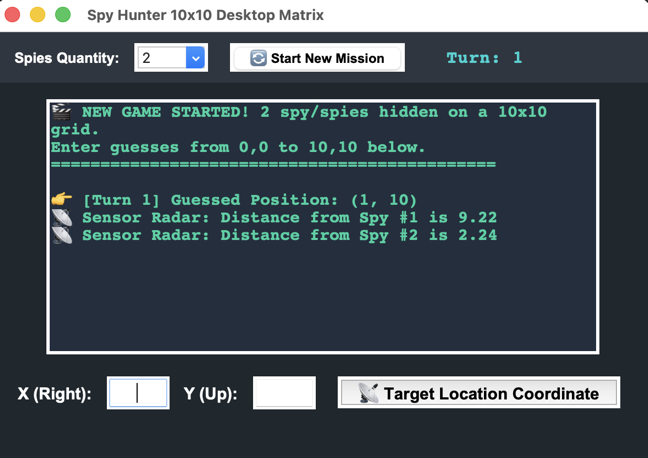
Spies in the Computer game
This is what will run if you enter the code below in the Pythion IDLE. What you would get in the 90's with a computer running it without graphics.
import tkinter as tk
from tkinter import ttk, messagebox
import math
import random

# ========================================================
# REUSABLE FUNCTIONS - CORE GAME MECHANICS AND LOGIC
# ========================================================

def start_new_game():
    """Initializes the spy dictionary array and resets variables."""
    global spies, turn_count

    # Grab chosen number of spies from the dropdown
    num_spies = int(spy_count_menu.get())
    turn_count = 0
    spies = []

    # Randomly place hidden spies on the 10x10 matrix layout
    for i in range(num_spies):
        spy_x = random.randint(0, 10)
        spy_y = random.randint(0, 10)
        spies.append({"x": spy_x, "y": spy_y, "found": False})

    # Clear tracking interface text windows
    feedback_box.delete("1.0", tk.END)
    feedback_box.insert(tk.END, f"🎬 NEW GAME STARTED! {num_spies} spy/spies hidden on a 10x10 grid.\n")
    feedback_box.insert(tk.END, "Enter guesses from 0,0 to 10,10 below.\n" + "="*45 + "\n")

    # Reset status labels
    turn_label.config(text="Turn: 0")
    guess_btn.config(state="normal") # Enable button if it was locked

def process_guess():
    """Validates user coordinate input and runs proximity calculations."""
    global turn_count

    # 1. Validation check on text box fields
    val_x = x_entry.get().strip()
    val_y = y_entry.get().strip()

    if not (val_x.isdigit() and val_y.isdigit()):
        messagebox.showerror("Invalid Input", "Please type whole numbers for X and Y coordinates.")
        return

    M = int(val_x)
    N = int(val_y)

    if not (0 <= M <= 10 and 0 <= N <= 10):
        messagebox.showerror("Out of Bounds", "Coordinates must be between 0 and 10.")
        return

    # 2. Advance the Turn Counter
    turn_count += 1
    turn_label.config(text=f"Turn: {turn_count}")

    feedback_box.insert(tk.END, f"\n👉 [Turn {turn_count}] Guessed Position: ({M}, {N})\n")

    # 3. Scan the spy array structure to calculate distances
    all_found = True

    for index, spy in enumerate(spies, start=1):
        if spy["found"]:
            continue

        # Check if coordinates exactly cross matching vectors
        if spy["x"] == M and spy["y"] == N:
            spy["found"] = True
            feedback_box.insert(tk.END, f"💥 TARGET HIT! You found Spy #{index}!\n")
        else:
            all_found = False # Still at least one spy alive
            # Apply Pythagorean distance math: SQR((X1-X2)^2 + (Y1-Y2)^2)
            distance = math.sqrt((spy["x"] - M)**2 + (spy["y"] - N)**2)
            feedback_box.insert(tk.END, f"📡 Sensor Radar: Distance from Spy #{index} is {round(distance, 2)}\n")

    # Scroll text box container straight to the bottom automatically
    feedback_box.see(tk.END)

    # Clear out input fields for the next shot
    x_entry.delete(0, tk.END)
    y_entry.delete(0, tk.END)
    x_entry.focus()

    # 4. Check Winning State Conditions
    if all_found:
        feedback_box.insert(tk.END, "\n🏆 " + "="*38 + "\n")
        feedback_box.insert(tk.END, f" MISSION ACCOMPLISHED!\n All spies located in {turn_count} turns.\n")
        feedback_box.insert(tk.END, "="*40 + "\n")
        feedback_box.see(tk.END)
        guess_btn.config(state="disabled") # Freeze button until restart clicked

# ========================================================
# GRAPHICS WINDOW LAYOUT INTERFACE DESIGN
# ========================================================

# Setup primary window container shell
app = tk.Tk()
app.title("Spy Hunter 10x10 Desktop Matrix")
app.geometry("520x460")
app.configure(bg="#1e272e") # Sleek charcoal workspace skin

# --- TOP PANEL: Setup Controls ---
# FIXED: Changed padding=10 to valid padx/pady properties
top_frame = tk.Frame(app, bg="#2f3640", padx=10, pady=10)
top_frame.pack(fill="x", side="top")

setup_label = tk.Label(top_frame, text="Spies Quantity:", fg="white", bg="#2f3640", font=("Arial", 10, "bold"))
setup_label.grid(row=0, column=0, padx=5)

# Use Combobox dropdown to prevent string parsing format typos
spy_count_menu = ttk.Combobox(top_frame, values=["1", "2", "3", "4", "5"], width=4, state="readonly")
spy_count_menu.current(1) # Default to 2 spies
spy_count_menu.grid(row=0, column=1, padx=5)

restart_btn = tk.Button(top_frame, text="🔄 Start New Mission", command=start_new_game, font=("Arial", 9, "bold"))
restart_btn.grid(row=0, column=2, padx=15)

turn_label = tk.Label(top_frame, text="Turn: 0", fg="#00d2d3", bg="#2f3640", font=("Courier", 12, "bold"))
turn_label.grid(row=0, column=3, padx=20)

# --- MID PANEL: Live Scrolling Logs Display Box ---
feedback_box = tk.Text(
    app,
    height=14,
    width=55,
    font=("Courier", 11, "bold"),
    bg="#222f3e",
    fg="#1dd1a1", # Classic retro terminal green phosphor text ink
    wrap=tk.WORD
)
feedback_box.pack(pady=15)

# --- BOTTOM PANEL: Coordinate Attack Launch Controls ---
bottom_frame = tk.Frame(app, bg="#1e272e")
bottom_frame.pack(pady=5)

x_label = tk.Label(bottom_frame, text="X (Right):", fg="white", bg="#1e272e", font=("Arial", 11, "bold"))
x_label.grid(row=0, column=0, padx=5)
x_entry = tk.Entry(bottom_frame, font=("Arial", 12), width=5, justify="center")
x_entry.grid(row=0, column=1, padx=5)

y_label = tk.Label(bottom_frame, text="Y (Up):", fg="white", bg="#1e272e", font=("Arial", 11, "bold"))
y_label.grid(row=0, column=2, padx=5)
y_entry = tk.Entry(bottom_frame, font=("Arial", 12), width=5, justify="center")
y_entry.grid(row=0, column=3, padx=5)

guess_btn = tk.Button(
    bottom_frame,
    text="📡 Target Location Coordinate",
    command=process_guess,
    font=("Arial", 11, "bold")
)
guess_btn.grid(row=0, column=4, padx=15)

# Initialize data vectors on initial startup load
start_new_game()

# Loop thread configuration
app.mainloop()
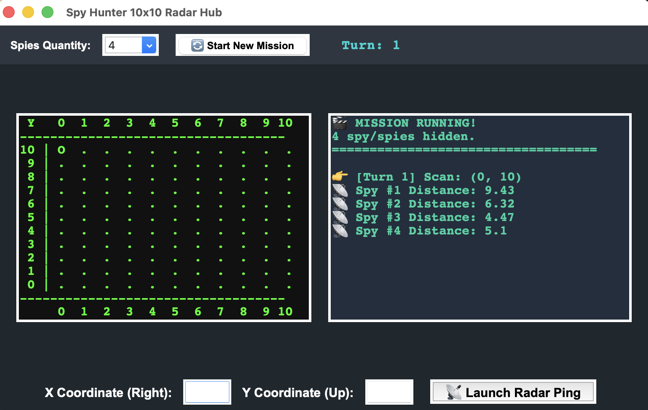
Spies in the COMPUTER game - with 10 x 10 grid & special effects
This is what will run if you enter the code below in the Pythion IDLE. What you would get in the 2000's with a computer running it graphics.
Game with grid and special effects.
import tkinter as tk
from tkinter import ttk, messagebox
import math
import random

# ========================================================
# REUSABLE FUNCTIONS - CORE GAME MECHANICS AND LOGIC
# ========================================================

def start_new_game():
    """Initializes the spy array, resets game variables, and wipes the matrix grid."""
    global spies, turn_count, grid_matrix

    num_spies = int(spy_count_menu.get())
    turn_count = 0
    spies = []

    # 1. Initialize a clean 11x11 tracking array grid map data structure (Indices 0 to 10)
    # Filling it with standard closed tracking dot characters
    grid_matrix = [[" . " for _ in range(11)] for _ in range(11)]

    # 2. Randomly place hidden spies on the 10x10 matrix layout
    for i in range(num_spies):
        spy_x = random.randint(0, 10)
        spy_y = random.randint(0, 10)
        spies.append({"x": spy_x, "y": spy_y, "found": False})

    # 3. Clear text panels and log structures
    feedback_box.delete("1.0", tk.END)
    feedback_box.insert(tk.END, f"🎬 MISSION RUNNING!\n{num_spies} spy/spies hidden.\n" + "="*35 + "\n")

    turn_label.config(text="Turn: 0")
    guess_btn.config(state="normal")

    # Render the initial clean map representation onto the interface display screen
    render_radar_display()

def render_radar_display():
    """Rebuilds the visual textual maps string and pushes it to the grid text frame."""
    radar_map_box.delete("1.0", tk.END)

    # Draw coordinates numbers row header across top axis line
    radar_map_box.insert(tk.END, " Y   0  1  2  3  4  5  6  7  8  9 10\n")
    radar_map_box.insert(tk.END, "---" + "-"*32 + "\n")

    # Standard graph rules demand plotting from the top down (Y=10 drops down to Y=0)
    for y in range(10, -1, -1):
        # Format the row axis margin index so spacing stays flush
        row_str = f"{y:2d} |"
        for x in range(11):
            row_str += grid_matrix[x][y]
        radar_map_box.insert(tk.END, row_str + "\n")

    radar_map_box.insert(tk.END, "---" + "-"*32 + "\n")
    radar_map_box.insert(tk.END, "     0  1  2  3  4  5  6  7  8  9 10  X\n")

def process_guess():
    """Validates user coordinate input and runs proximity calculations."""
    global turn_count

    # 1. Input Validation
    val_x = x_entry.get().strip()
    val_y = y_entry.get().strip()

    if not (val_x.isdigit() and val_y.isdigit()):
        messagebox.showerror("Invalid Input", "Please type whole numbers for X and Y coordinates.")
        return

    M = int(val_x)
    N = int(val_y)

    if not (0 <= M <= 10 and 0 <= N <= 10):
        messagebox.showerror("Out of Bounds", "Coordinates must be between 0 and 10.")
        return

    # 2. Advance game variables
    turn_count += 1
    turn_label.config(text=f"Turn: {turn_count}")
    feedback_box.insert(tk.END, f"\n👉 [Turn {turn_count}] Scan: ({M}, {N})\n")

    # Set default matrix indicator to 'O' for miss, will get overwritten if it crosses target vectors
    grid_matrix[M][N] = " O "

    # 3. Check tracking arrays
    all_found = True
    for index, spy in enumerate(spies, start=1):
        if spy["found"]:
            continue

        if spy["x"] == M and spy["y"] == N:
            spy["found"] = True
            grid_matrix[M][N] = "💥 " # Stamp flame cluster icon at target coordinates matrix node
            feedback_box.insert(tk.END, f"💥 TARGET HIT! Located Spy #{index}!\n")
        else:
            all_found = False
            distance = math.sqrt((spy["x"] - M)**2 + (spy["y"] - N)**2)
            feedback_box.insert(tk.END, f"📡 Spy #{index} Distance: {round(distance, 2)}\n")

    # Refresh the text map canvas window display
    render_radar_display()

    # Clear out input fields and autofocus
    feedback_box.see(tk.END)
    x_entry.delete(0, tk.END)
    y_entry.delete(0, tk.END)
    x_entry.focus()

    # 4. Check Win State Conditions
    if all_found:
        feedback_box.insert(tk.END, "\n🏆 " + "="*28 + "\n")
        feedback_box.insert(tk.END, f" SYSTEM CLEAR!\n All targets cleared in {turn_count} turns.\n")
        feedback_box.insert(tk.END, "="*30 + "\n")
        feedback_box.see(tk.END)
        guess_btn.config(state="disabled")

# ========================================================
# GRAPHICS WINDOW LAYOUT INTERFACE DESIGN
# ========================================================

app = tk.Tk()
app.title("Spy Hunter 10x10 Radar Hub")
app.geometry("780x460") # Widened interface frame window layout parameter bounding box
app.configure(bg="#1e272e")

# --- TOP PANEL: Controls ---
top_frame = tk.Frame(app, bg="#2f3640", padx=10, pady=10)
top_frame.pack(fill="x", side="top")

setup_label = tk.Label(top_frame, text="Spies Quantity:", fg="white", bg="#2f3640", font=("Arial", 10, "bold"))
setup_label.grid(row=0, column=0, padx=5)

spy_count_menu = ttk.Combobox(top_frame, values=["1", "2", "3", "4", "5"], width=4, state="readonly")
spy_count_menu.current(1)
spy_count_menu.grid(row=0, column=1, padx=5)

restart_btn = tk.Button(top_frame, text="🔄 Start New Mission", command=start_new_game, font=("Arial", 9, "bold"))
restart_btn.grid(row=0, column=2, padx=15)

turn_label = tk.Label(top_frame, text="Turn: 0", fg="#00d2d3", bg="#2f3640", font=("Courier", 12, "bold"))
turn_label.grid(row=0, column=3, padx=20)

# --- MIDDLE CONTAINER HOLDER (Arranges layout side-by-side) ---
dashboard_frame = tk.Frame(app, bg="#1e272e")
dashboard_frame.pack(pady=15, padx=15, fill="both", expand=True)

# LEFT SIDE PANEL: Clean Radar Screen Display
radar_map_box = tk.Text(
    dashboard_frame,
    height=15,
    width=38,
    font=("Courier", 11, "bold"),
    bg="#111111",
    fg="#00ff00", # Radioactive high-intensity green HUD matrix color profile
)
radar_map_box.pack(side="left", padx=10)

# RIGHT SIDE PANEL: Log Tracking Feed Box
feedback_box = tk.Text(
    dashboard_frame,
    height=15,
    width=42,
    font=("Courier", 11, "bold"),
    bg="#222f3e",
    fg="#1dd1a1",
    wrap=tk.WORD
)
feedback_box.pack(side="right", padx=10)

# --- BOTTOM PANEL: Command Form Controllers ---
bottom_frame = tk.Frame(app, bg="#1e272e")
bottom_frame.pack(pady=10, side="bottom")

x_label = tk.Label(bottom_frame, text="X Coordinate (Right):", fg="white", bg="#1e272e", font=("Arial", 11, "bold"))
x_label.grid(row=0, column=0, padx=5)
x_entry = tk.Entry(bottom_frame, font=("Arial", 12), width=5, justify="center")
x_entry.grid(row=0, column=1, padx=5)

y_label = tk.Label(bottom_frame, text="Y Coordinate (Up):", fg="white", bg="#1e272e", font=("Arial", 11, "bold"))
y_label.grid(row=0, column=2, padx=5)
y_entry = tk.Entry(bottom_frame, font=("Arial", 12), width=5, justify="center")
y_entry.grid(row=0, column=3, padx=5)

guess_btn = tk.Button(
    bottom_frame,
    text="📡 Launch Radar Ping",
    command=process_guess,
    font=("Arial", 11, "bold")
)
guess_btn.grid(row=0, column=4, padx=15)

# Initialize vectors and matrix
start_new_game()

app.mainloop()
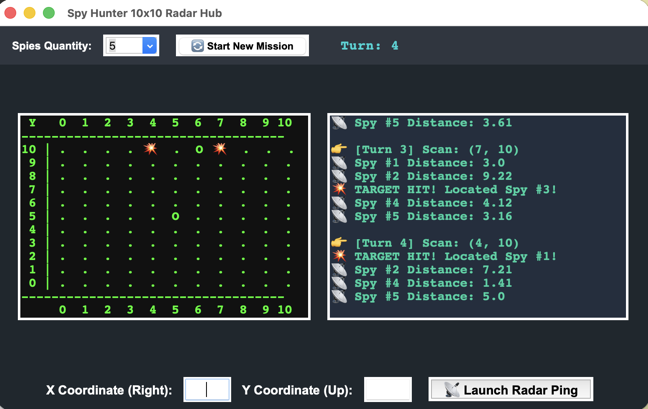
Spies in the COMPUTER game with backdoor
A backdoorfor teachers to be able to finish the game if need to process what is going on. You can also demonstrate how programmers use backdoors while programming.
import tkinter as tk
from tkinter import ttk, messagebox
import math
import random

# ========================================================
# REUSABLE FUNCTIONS - CORE GAME MECHANICS AND LOGIC
# ========================================================

def start_new_game():
    """Initializes the spy array, resets game variables, and wipes the matrix grid."""
    global spies, turn_count, grid_matrix

    num_spies = int(spy_count_menu.get())
    turn_count = 0
    spies = []

    # Initialize a clean 11x11 tracking array grid map data structure (Indices 0 to 10)
    grid_matrix = [[" . " for _ in range(11)] for _ in range(11)]

    # Randomly place hidden spies on the 10x10 matrix layout
    for i in range(num_spies):
        spy_x = random.randint(0, 10)
        spy_y = random.randint(0, 10)
        spies.append({"x": spy_x, "y": spy_y, "found": False})

    # Clear text panels and log structures
    feedback_box.delete("1.0", tk.END)
    feedback_box.insert(tk.END, f"🎬 MISSION RUNNING!\n{num_spies} spy/spies hidden.\n" + "="*35 + "\n")

    turn_label.config(text="Turn: 0")
    guess_btn.config(state="normal")

    # Render the initial clean map representation onto the interface display screen
    render_radar_display()

def render_radar_display():
    """Rebuilds the visual textual maps string and pushes it to the grid text frame."""
    radar_map_box.delete("1.0", tk.END)

    # Draw coordinates numbers row header across top axis line
    radar_map_box.insert(tk.END, " Y   0  1  2  3  4  5  6  7  8  9 10\n")
    radar_map_box.insert(tk.END, "---" + "-"*32 + "\n")

    # Standard graph rules demand plotting from the top down (Y=10 drops down to Y=0)
    for y in range(10, -1, -1):
        # Format the row axis margin index so spacing stays flush
        row_str = f"{y:2d} |"
        for x in range(11):
            row_str += grid_matrix[x][y]
        radar_map_box.insert(tk.END, row_str + "\n")

    radar_map_box.insert(tk.END, "---" + "-"*32 + "\n")
    radar_map_box.insert(tk.END, "     0  1  2  3  4  5  6  7  8  9 10  X\n")

def process_guess():
    """Validates user coordinate input, checks for cheat codes, and runs proximity calculations."""
    global turn_count

    # 1. Input Validation
    val_x = x_entry.get().strip()
    val_y = y_entry.get().strip()

    if not (val_x.isdigit() and val_y.isdigit()):
        messagebox.showerror("Invalid Input", "Please type whole numbers for X and Y coordinates.")
        return

    M = int(val_x)
    N = int(val_y)

    # --- SECRET CHEAT CODE DETECTOR ---
    if M == 99 and N == 99:
        feedback_box.insert(tk.END, "\n🔓 [OVERRIDE CODE 99 DETECTED]\n⚠️ Satellite uplink hacked! Revealing spy locations...\n")

        # Loop through all remaining hidden spies and expose their coordinates on our map matrix
        for index, spy in enumerate(spies, start=1):
            if not spy["found"]:
                # Stamp a secret skull symbol at their specific X and Y map position nodes
                grid_matrix[spy["x"]][spy["y"]] = "☠️ "
                feedback_box.insert(tk.END, f"👁️ Spy #{index} tracked at position: ({spy['x']}, {spy['y']})\n")

        # Force a visual map canvas refresh to display the hidden skulls
        render_radar_display()

        # Clean out input boxes and wrap up early without consuming a game turn
        feedback_box.see(tk.END)
        x_entry.delete(0, tk.END)
        y_entry.delete(0, tk.END)
        x_entry.focus()
        return

    # Fallback to normal bounds check if it wasn't the secret cheat code
    if not (0 <= M <= 10 and 0 <= N <= 10):
        messagebox.showerror("Out of Bounds", "Coordinates must be between 0 and 10.")
        return

    # 2. Advance game variables
    turn_count += 1
    turn_label.config(text=f"Turn: {turn_count}")
    feedback_box.insert(tk.END, f"\n👉 [Turn {turn_count}] Scan: ({M}, {N})\n")

    # Set default matrix indicator to 'O' for miss, will get overwritten if it crosses target vectors
    grid_matrix[M][N] = " O "

    # 3. Check tracking arrays
    all_found = True
    for index, spy in enumerate(spies, start=1):
        if spy["found"]:
            continue

        if spy["x"] == M and spy["y"] == N:
            spy["found"] = True
            grid_matrix[M][N] = "💥 " # Stamp flame cluster icon at target coordinates matrix node
            feedback_box.insert(tk.END, f"💥 TARGET HIT! Located Spy #{index}!\n")
        else:
            all_found = False
            distance = math.sqrt((spy["x"] - M)**2 + (spy["y"] - N)**2)
            feedback_box.insert(tk.END, f"📡 Spy #{index} Distance: {round(distance, 2)}\n")

    # Refresh the text map canvas window display
    render_radar_display()

    # Clear out input fields and autofocus
    feedback_box.see(tk.END)
    x_entry.delete(0, tk.END)
    y_entry.delete(0, tk.END)
    x_entry.focus()

    # 4. Check Win State Conditions
    if all_found:
        feedback_box.insert(tk.END, "\n🏆 " + "="*28 + "\n")
        feedback_box.insert(tk.END, f" SYSTEM CLEAR!\n All targets cleared in {turn_count} turns.\n")
        feedback_box.insert(tk.END, "="*30 + "\n")
        feedback_box.see(tk.END)
        guess_btn.config(state="disabled")

# ========================================================
# GRAPHICS WINDOW LAYOUT INTERFACE DESIGN
# ========================================================

app = tk.Tk()
app.title("Spy Hunter 10x10 Radar Hub")
app.geometry("780x460")
app.configure(bg="#1e272e")

# --- TOP PANEL: Controls ---
top_frame = tk.Frame(app, bg="#2f3640", padx=10, pady=10)
top_frame.pack(fill="x", side="top")

setup_label = tk.Label(top_frame, text="Spies Quantity:", fg="white", bg="#2f3640", font=("Arial", 10, "bold"))
setup_label.grid(row=0, column=0, padx=5)

spy_count_menu = ttk.Combobox(top_frame, values=["1", "2", "3", "4", "5"], width=4, state="readonly")
spy_count_menu.current(1)
spy_count_menu.grid(row=0, column=1, padx=5)

restart_btn = tk.Button(top_frame, text="🔄 Start New Mission", command=start_new_game, font=("Arial", 9, "bold"))
restart_btn.grid(row=0, column=2, padx=15)

turn_label = tk.Label(top_frame, text="Turn: 0", fg="#00d2d3", bg="#2f3640", font=("Courier", 12, "bold"))
turn_label.grid(row=0, column=3, padx=20)

# --- MIDDLE CONTAINER HOLDER (Arranges layout side-by-side) ---
dashboard_frame = tk.Frame(app, bg="#1e272e")
dashboard_frame.pack(pady=15, padx=15, fill="both", expand=True)

# LEFT SIDE PANEL: Clean Radar Screen Display
radar_map_box = tk.Text(
    dashboard_frame,
    height=15,
    width=38,
    font=("Courier", 11, "bold"),
    bg="#111111",
    fg="#00ff00",
)
radar_map_box.pack(side="left", padx=10)

# RIGHT SIDE PANEL: Log Tracking Feed Box
feedback_box = tk.Text(
    dashboard_frame,
    height=15,
    width=42,
    font=("Courier", 11, "bold"),
    bg="#222f3e",
    fg="#1dd1a1",
    wrap=tk.WORD
)
feedback_box.pack(side="right", padx=10)

# --- BOTTOM PANEL: Command Form Controllers ---
bottom_frame = tk.Frame(app, bg="#1e272e")
bottom_frame.pack(pady=10, side="bottom")

x_label = tk.Label(bottom_frame, text="X Coordinate (Right):", fg="white", bg="#1e272e", font=("Arial", 11, "bold"))
x_label.grid(row=0, column=0, padx=5)
x_entry = tk.Entry(bottom_frame, font=("Arial", 12), width=5, justify="center")
x_entry.grid(row=0, column=1, padx=5)

y_label = tk.Label(bottom_frame, text="Y Coordinate (Up):", fg="white", bg="#1e272e", font=("Arial", 11, "bold"))
y_label.grid(row=0, column=2, padx=5)
y_entry = tk.Entry(bottom_frame, font=("Arial", 12), width=5, justify="center")
y_entry.grid(row=0, column=3, padx=5)

guess_btn = tk.Button(
    bottom_frame,
    text="📡 Launch Radar Ping",
    command=process_guess,
    font=("Arial", 11, "bold")
)
guess_btn.grid(row=0, column=4, padx=15)

# Initialize vectors and matrix
start_new_game()

app.mainloop()
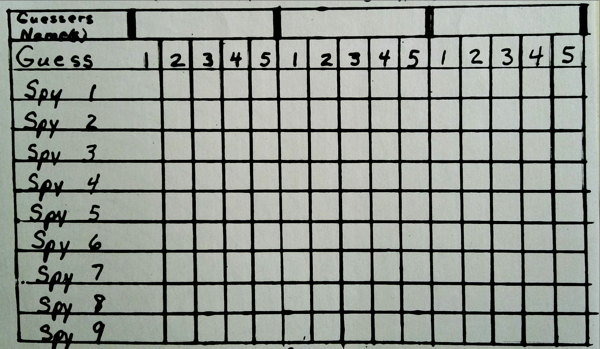
Guesses worksheet
Print out for all grid distances from 0,0
Blank grid worksheet
Two guesses illustrated
Whole numbers examples from different starting positions
Ben's soutions grid
Guess 0,55 distances